
Outlook and visibility on this quarter's targets
Attainment only appears after each rep's spreadsheet is merged at month-end.
ISPark Integrated Business Management System 2
From sales to accounting, all financial and sales data is consolidated on a single contract basis. Management gets answers the same day, not at month-end, and employees' AI use runs within permissions, audit logs and measurable results.
Why IBMS-2
Not for lack of systems — the numbers in spreadsheets, the ERP and sales sheets simply did not connect.
Attainment only appears after each rep's spreadsheet is merged at month-end.
Deals are signed on gross profit alone, before overhead and contingency.
Expenses live in the ERP, contracts in sales sheets. People reconcile them by hand.
Numbers change even after approval, and there is no baseline to measure late collection.
Personal accounts and self-reported estimates leave nothing you can prove.
Product
Every screen below is IBMS-2 in production today, shown with sample data for a fictional company. The product UI is in Korean.
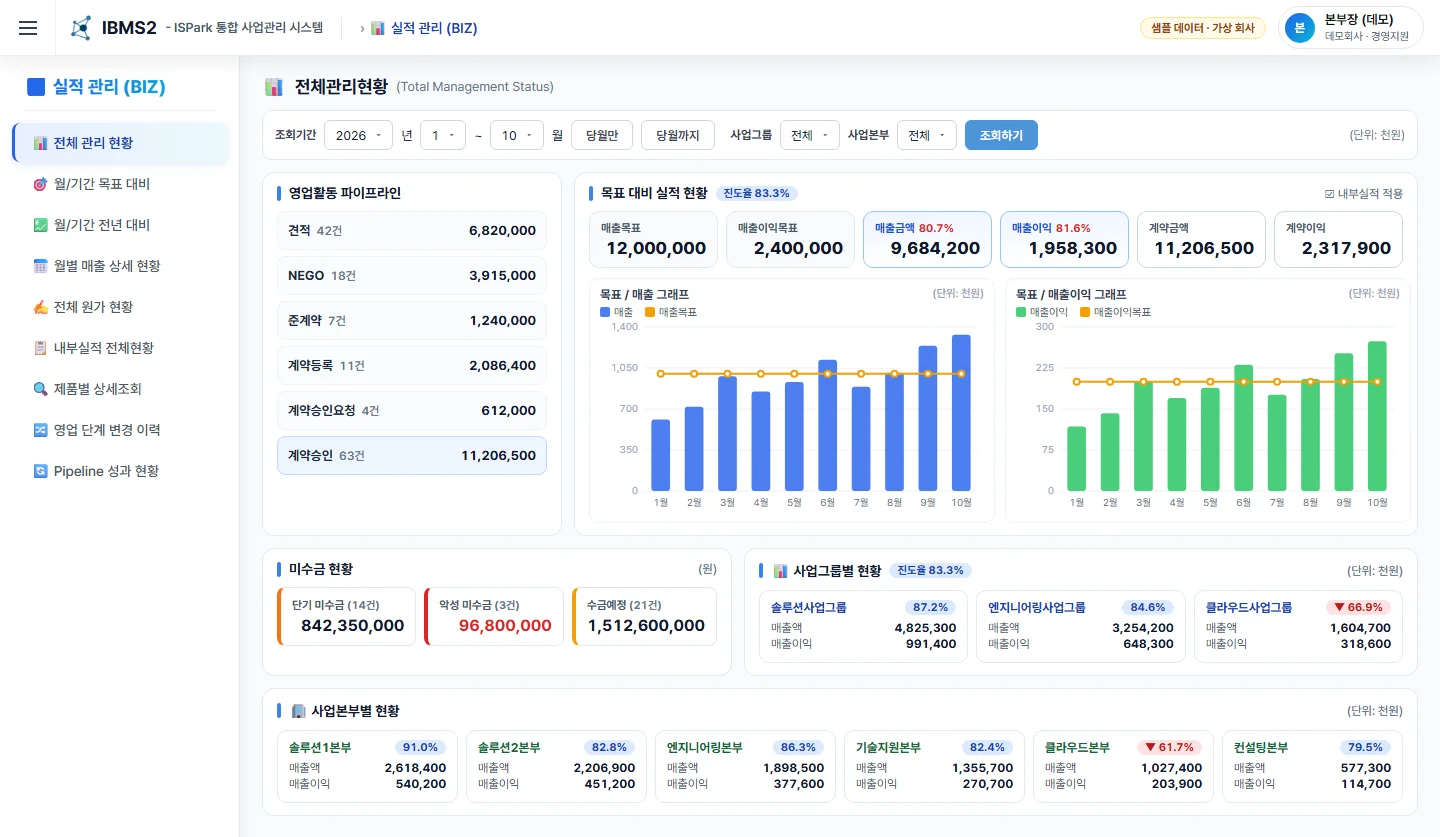
01Outlook and visibility on this quarter's targets
Sixteen indicators — target, contracts, revenue, receivables and expected collections — sit on one screen. Pipeline coverage is calculated and analyzed automatically, so divisions at risk surface mid-quarter.
Before Month-end spreadsheet roll-ups, different numbers in every document
From after-the-fact reporting to early warning
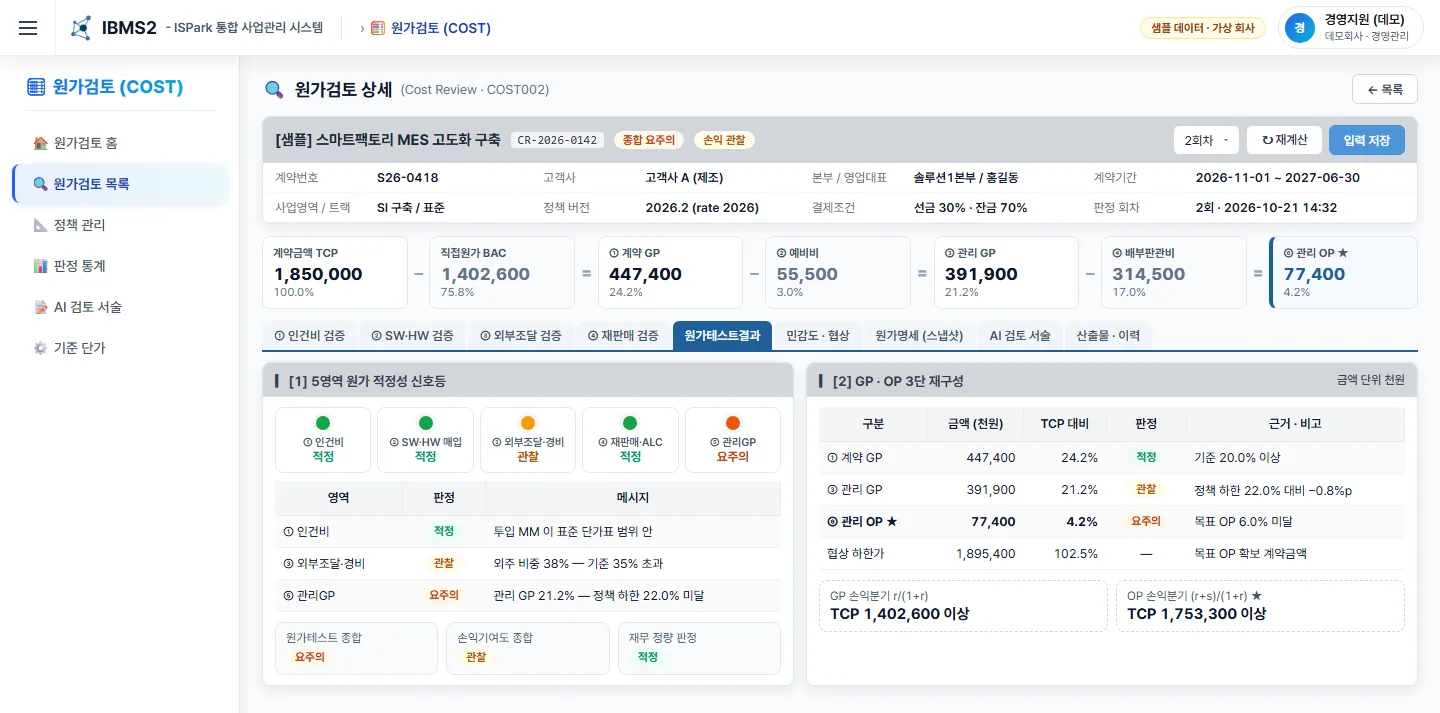
02Real margin and financial viability of contracts won
We replaced approvals on gross profit alone. Managed operating profit is calculated after contingency and overhead, with traffic lights across five areas and a negotiation floor.
Before Checks in personal spreadsheets and email, with no standard or history
Loss-making deals identified before signing
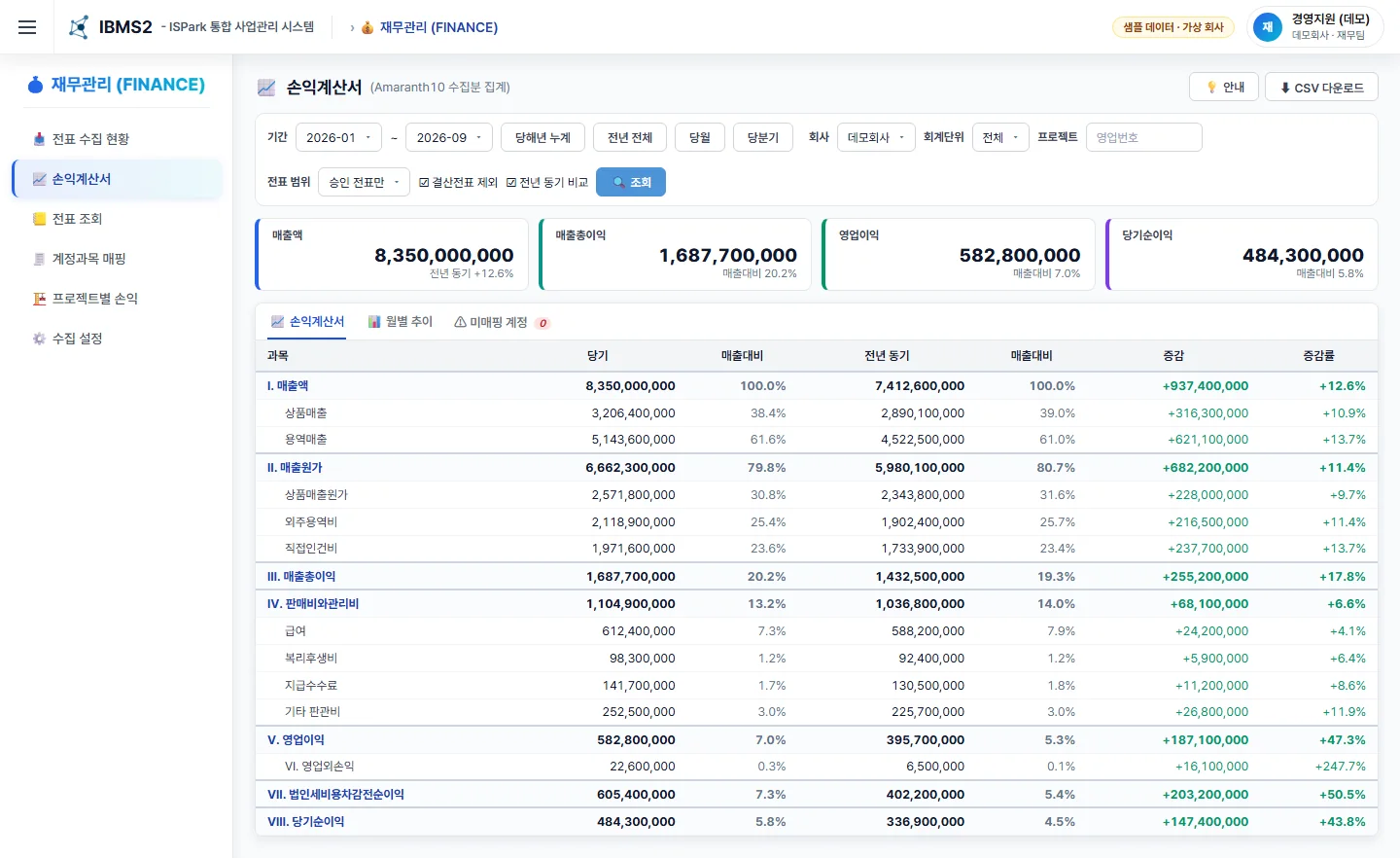
03Actual project costs and P&L analysis
ERP vouchers are collected daily and attached to contracts by sales number. Duplicate manual data entry is eliminated at the source, and you see project P&L and the company income statement immediately.
Before Double entry in two systems, project P&L only by hand
Zero double entry, project P&L on demand
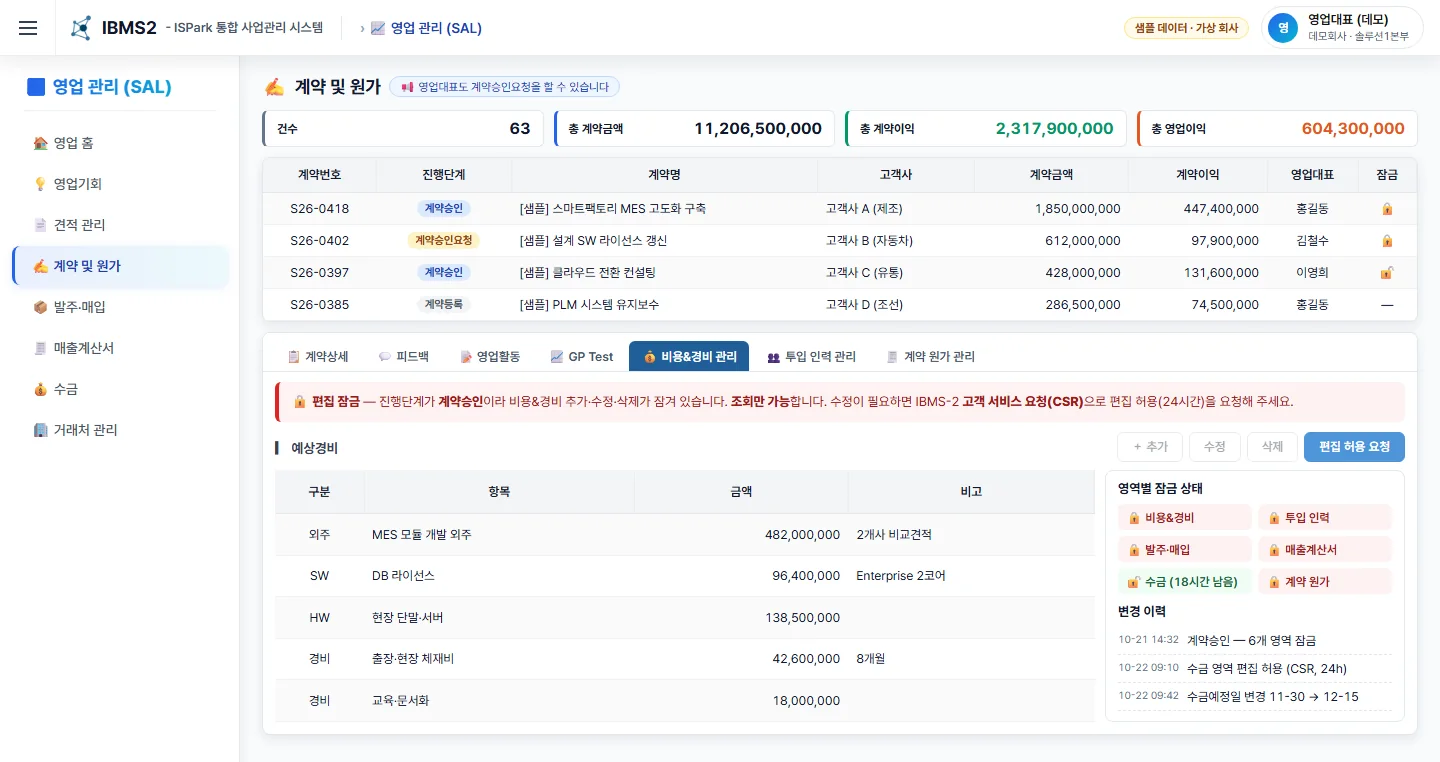
04Collection scheduling and cash flow forecasting
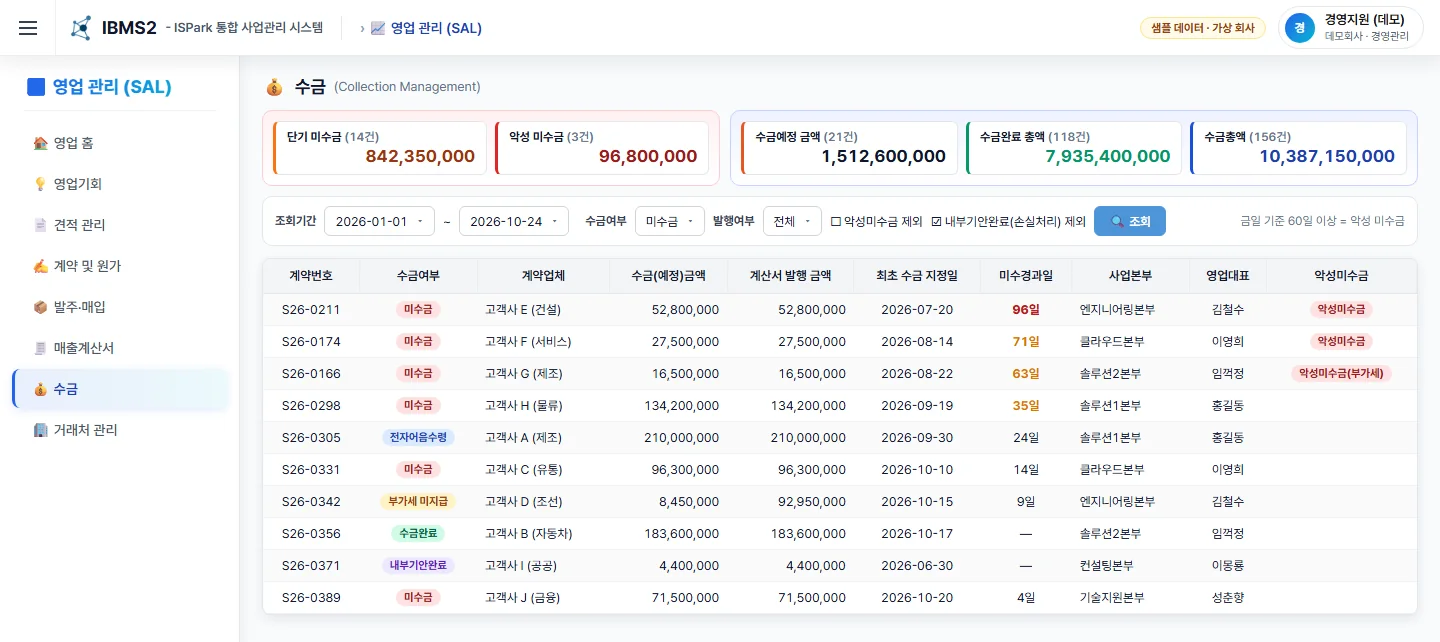
Once a contract is approved, six areas including orders, invoices and collections are locked. Edits open only temporarily per area after a request and approval, and every change is recorded.
Before Approved contracts still editable; revenue splits agreed by hand in meetings
Numbers you can trust, cash flow the system protects
05AI return on investment (ROI) and quantified results
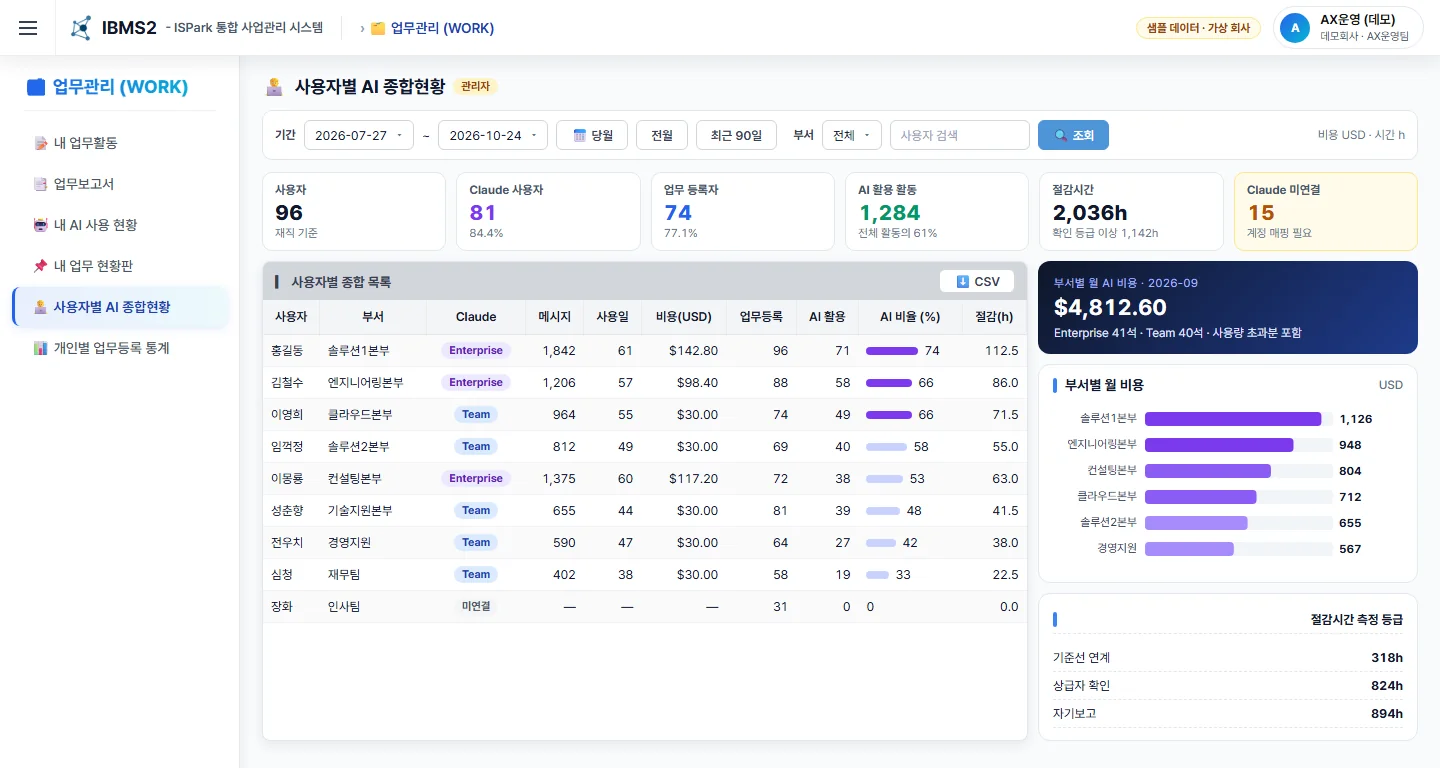
AI seats, usage and cost are collected daily, and the work employees do with AI is recorded with a baseline time. Report cost by department and results with a measurement grade.
Before Personal accounts; usage, cost and results unknown
Controlled AI spend and defensible results reporting
Sales-to-Cash
No step drops out into a spreadsheet. Every change at every stage is kept in the history.
Modules
Sales stages and BANT, quote revisions and PDF, GP Test, contracts, orders, purchases, payments, sales invoices, collections, internal revenue splits
Contract snapshots, policy versions, managed-OP decisions, traffic lights, sensitivity and negotiation floor
16-KPI overview, target and year-over-year comparison, pipeline coverage, receivables and bad debt
Automatic ERP voucher collection and change detection, account mapping, monthly and annual income statements
Personal API keys, four-level permission and scope guards, every call logged, AI usage and cost management
Activity logging and carry-over, auto-generated daily, weekly and monthly reports, AI impact fields
Contract approval, GP Test and unlock requests in one approval inbox, with serial and parallel approval lines
Intake of issues, questions and requests, automatic assignment, SLA and lead-time dashboard
Lot management of pre-purchased licenses, assignment to contracts and inventory cost, aging of long-held stock
Budget by project and year, spending upload from spreadsheets, participation-rate limits, annual settlement
HR master and department history, servers, PCs and software licenses, server-room access records
Common codes, organization versions, group permissions, audit logs, mail queue, attachments and NAS
AI Governance
AI sees data only through the same queries as the user's screens. A sales rep sees only their own scope.
Who called which tool and when is always recorded; passwords, keys and personal data are masked.
Time saved is captured with a baseline, and trust grades move from self-report to manager confirmation to baseline-linked.
Seats, usage and cost are collected daily, showing monthly cost by department and usage by person.
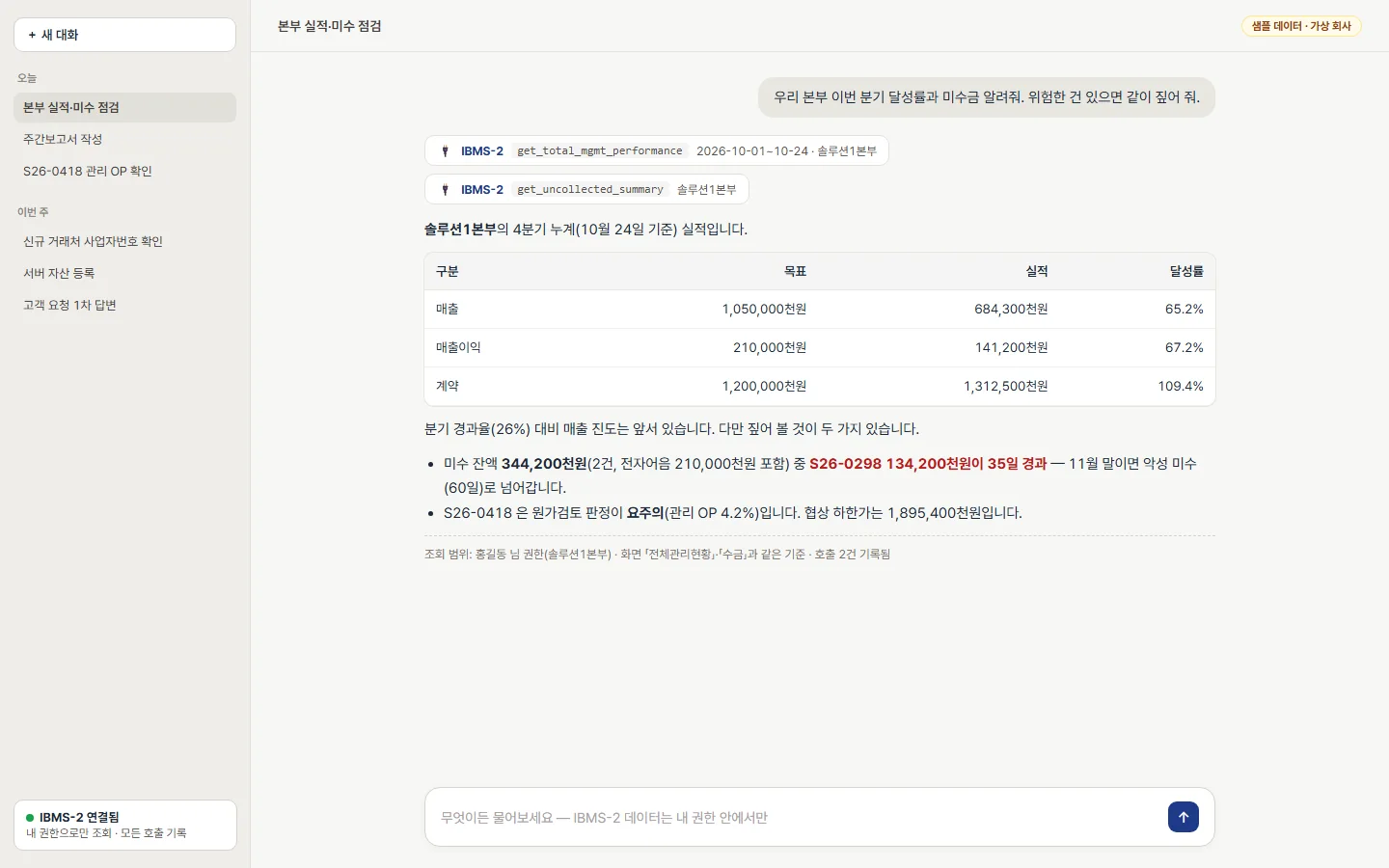
Ask your AI app instead of opening a screen, and lookups, records and reports are done with your own permissions. All of these are in daily use.
Log what I did this week and add next week's planRegister and confirm activities, set visibility
Write this week's reportActivities rolled up → AI drafts the text → a person confirms
Show our division's attainment and receivables this quarterOverview, collections and pipeline queries
Show managed OP and staffing for this contractContract cost status, monthly staffing, change history
Check whether this business is closed and pull its financialsNational Tax Service status and Financial Services Commission company data
Register the new server as an assetRegister and assign servers, PCs and software licenses
Post a first reply to the new requestsRequest lookup, AI first response, handling history
Email the findings to the people involvedReport mail sent through the company mail server
Roadmap
Management that records → that judges → that forecasts → that works alongside AI
STAGE 1 · In operation
STAGE 2 · Q4 2026
STAGE 3 · H1 2027 (planned)
STAGE 4 · H2 2027 onward (planned)
Stages 3 and 4 are plans; scope and timing may change.
Proven in Operation
ISPark designed and built IBMS-2 itself, and the whole company has used it every day since April 2026. One team owns planning, development, operations and AI governance.
The profit-decision structure, post-approval locks and shared metric definitions for screens and AI all came from real operating data and incident response.
Customers start from proven formulas, a permission model, a history structure and design documents.
Demo
Get a guided demo in an environment built on a fictional company, or try it yourself with role-based trial accounts. Email ibms2 [at] ispark.kr and we will set it up.
Adoption
Installed on your servers (Linux + PostgreSQL). Best for data sovereignty and internal ERP integration.
Deployed to an environment dedicated to you, with ISPark running operations on your behalf.
Planned, with per-company tenant isolation and subscription billing.
FAQ
Sales stages are managed as common codes, not hard-coded into screens. Adding or renaming stages is a master-data setting; changes to the mandatory checks at each stage are scoped in the Fit/Gap analysis.
Voucher collection and project registration currently follow the Amaranth10 format, a widely used Korean ERP. For other ERPs we build an adapter from the interface specification; account mapping, P&L calculation and project assignment after collection are reused as is.
Pricing is not per user. It is based on the domains in scope, the number of integrations and the extent of customization, and we confirm the quote after the Fit/Gap analysis.
We use organization accounts only with training on customer data turned off. The system also caps response size and masks personal data. AI integration is optional, and IBMS-2 runs fine with it switched off.
Migration tooling is included. Data moves in order — organization and users, partners and products, open opportunities and contracts, then outstanding invoices and collections — and contract amounts, issued revenue and receivable balances are reconciled.
Yes. We provide the source code with installation and operations guides, the database design and interface specifications. We recommend a maintenance contract for the first year.
The application screens are currently in Korean, and so is the demo site. Please contact us about English localization for your rollout.
Yes. You can request a guided demo or trial accounts on the demo page.
Explore the role-based screens on the demo site, then compare them with your processes in a Fit/Gap workshop.
AX Operations Team, Strategy Planning Office, ISPark Co., Ltd. ·